
Ask beside the page
Send questions and requests in the built-in CoDriver chat. Read the connected AI’s response and ask follow-up questions in the same work context.

Parallax Browser
Launch schedulePublic release planned for early 2027
Copying page text, explaining your login context and moving AI answers back to the web? Send your request in Parallax Browser’s CoDriver chat. A connected AI can read the same tab and continue with permitted web actions.
An open-source project developed and maintained by ORASCOPE
Distributed under the Apache License 2.0. Apache License 2.0
Repositories and installation files currently require access permission. Include the project name when contacting us.
github.com/orascope/parallax-browserInside the app
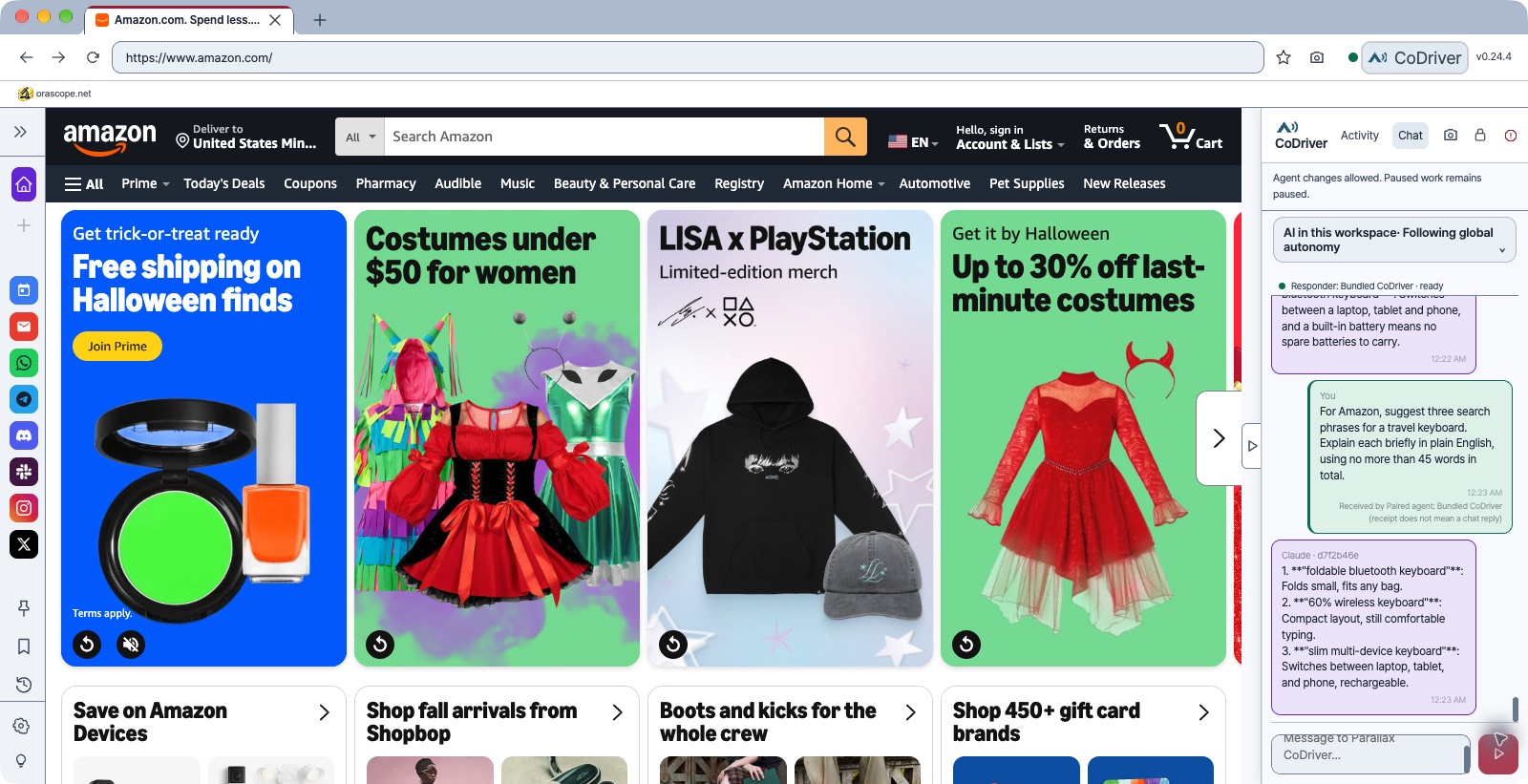
With Amazon open, a user asks in English for search phrases for a travel keyboard. This real CoDriver conversation shows three suggestions with brief explanations.
An AI Browser that works on the web you see
Send questions and requests in the built-in CoDriver chat. Read the connected AI’s response and ask follow-up questions in the same work context.
People and AI work with the same tabs and signed-in session. Reduce the need to prepare the same account again in a separate automation browser.
AI can inspect text, tables, buttons and form fields. Move from a request to organize information into actions on the page.
Group tabs and conversations in workspaces. Keep different projects’ pages and conversations from getting mixed together.
Stop agent changes in the browser and allow them again after human review. This does not undo actions that have already been submitted.
Use tabs, bookmarks, history, downloads and supported extensions alongside AI. Idle tabs can also be put to sleep.
Protection & control
Requests to domains on the blocklist are restricted.
Important internal data, including the password vault and settings, is encrypted when stored.
Sensitive AI actions, such as payments, publishing and account security changes, require your approval.
Connected AI shares your tabs and signed-in session. Review your connection settings and service terms to understand what information may be sent to external AI services.
Working with it
Parallax Browser puts answers and actions in the same workspace. Assign work and review what happens without separating the conversation from the page.
Getting started
The GitHub repository currently requires access permission. The browser is an Apache License 2.0 project; connected AI services have their own accounts and usage costs.
Prepare the browser using the quick-start guide, then open the site you need and sign in yourself.
Set up an AI connection, then request the information or action you need on the current page. Be specific about the scope.
Check the AI response alongside the actual page. Handle steps that need human verification, then continue with your next request.
Use cases
Ask AI to organize differences in conditions or descriptions across pages. Check the results against the sources and follow up in chat.
Ask a connected AI to inspect items or enter information in a signed-in business page, within the site’s permissions and allowed actions.
Inspect a problem page together with AI. Use page content and browser error information to narrow down what went wrong.
How it connects
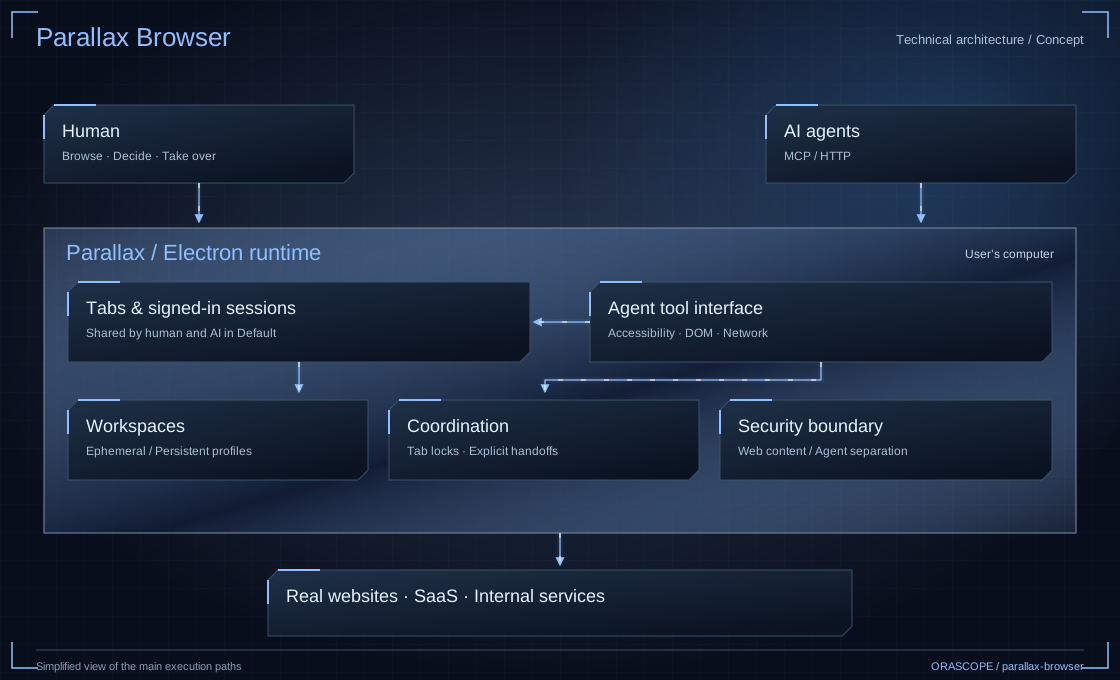
A person and connected AI work in the same browser. CoDriver chat carries requests and responses, while the browser manages tabs, signed-in sessions and permission to act.
FAQ
Parallax makes your actual browser the shared workspace. A connected AI can read the same tab and perform permitted actions, reducing the need to copy page context into another chat window.
You need to set up an AI connection to receive responses. macOS offers a bundled CoDriver setup path. Check the project documentation for other platforms and connection requirements.
Available actions depend on the site, login state and permissions. AI can read and interact with pages that have no dedicated integration, but support for every website is not guaranteed.
You handle steps that require personal authentication or human verification. Sharing a signed-in session does not authorize every possible AI action.
The browser and profile run on your computer. Connecting an external AI service may send data needed for your requests to that service. Review the connection settings and service terms.
No. Parallax Browser is an Apache License 2.0 open-source project developed and maintained by ORASCOPE. Connected AI services and separate components have their own terms and any applicable charges.