
See the server’s condition on one screen
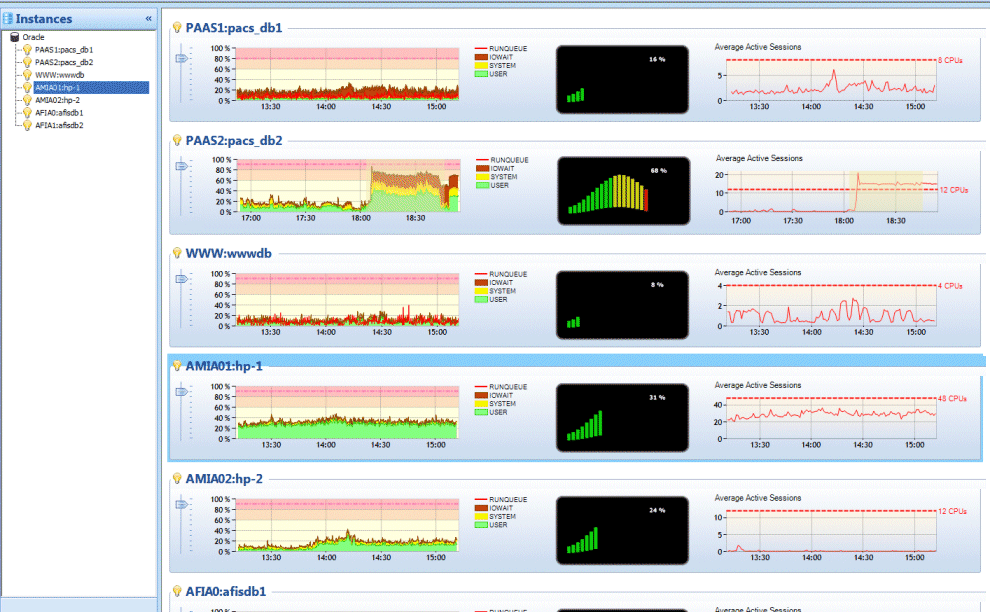
OS CPU usage is shown alongside wait events and Time Model metrics. Check whether CPU is short and which waits have grown, all in one view.

OraBooster
AvailabilityReleased · Available now
Go from a CPU spike to the SQL behind it, and on to its execution plan, in a few clicks. Nothing is installed on the monitored database. Connect with a DBA-privileged account and start working.
Closed-source commercial software
OraBooster is a commercial product, not open source.
Inside OraBooster
Actual captures of the multi-instance dashboard, ASH Explorer, session, execution plan and SQL tuning screens.
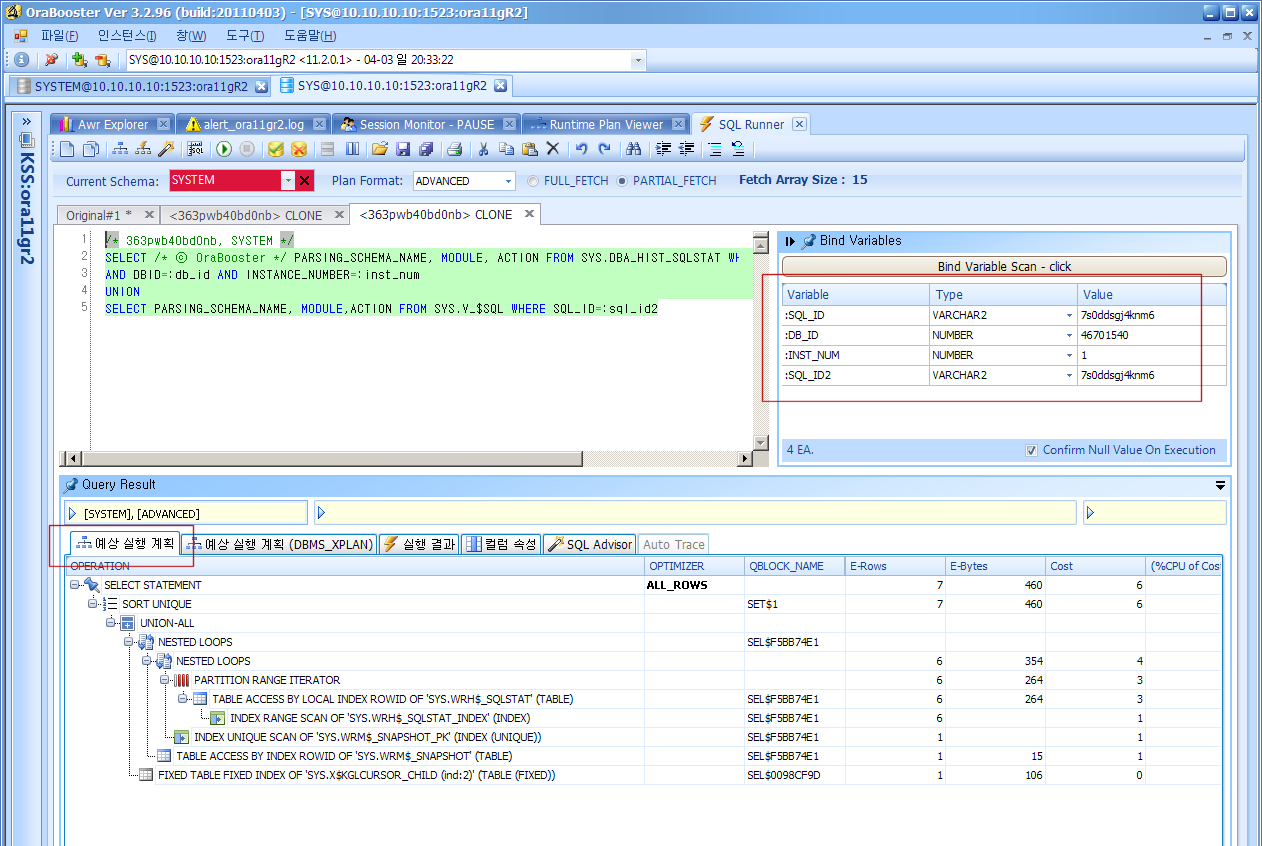
These screens were captured from an earlier version. The current version may look different. Some connection details are masked.
A commercial Oracle performance diagnostics and tuning tool
OS CPU usage is shown alongside wait events and Time Model metrics. Check whether CPU is short and which waits have grown, all in one view.
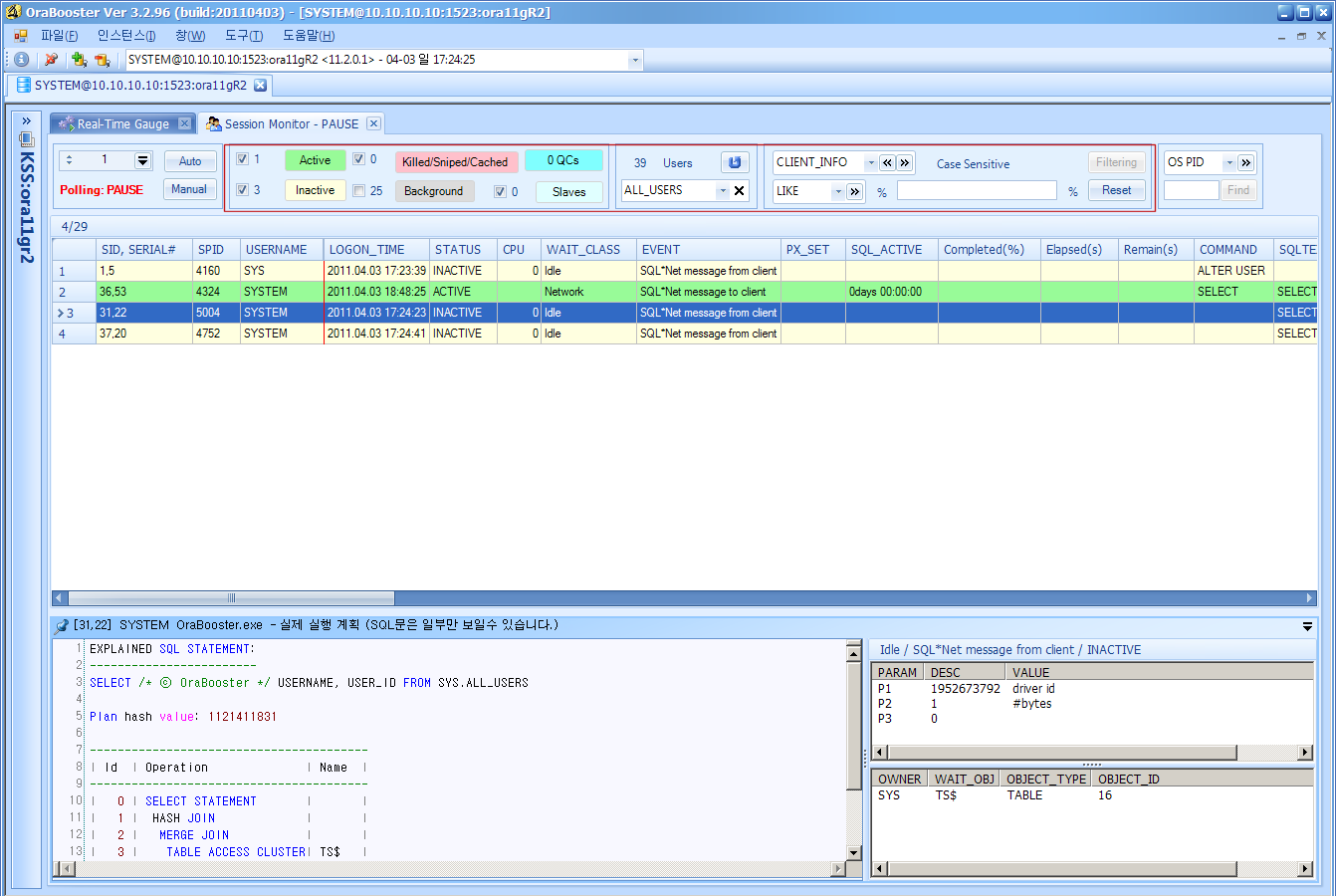
Filter sessions by state, user or program, and read the execution plan of the SQL a selected session is running, right there. You can also find a session by its OS PID.
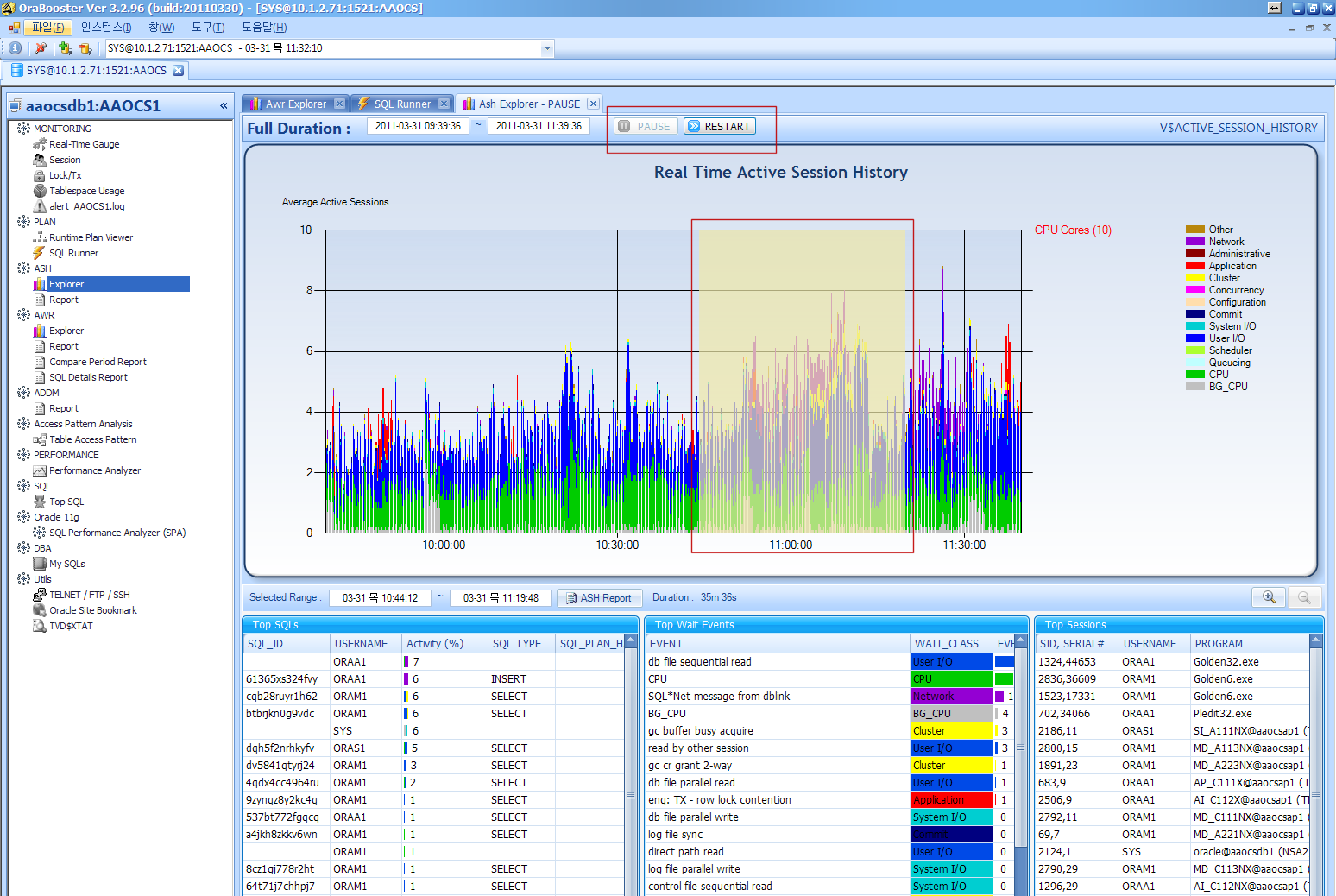
ASH and AWR data are drawn as charts. Drag across a busy period to see its top SQL, sessions and wait events.
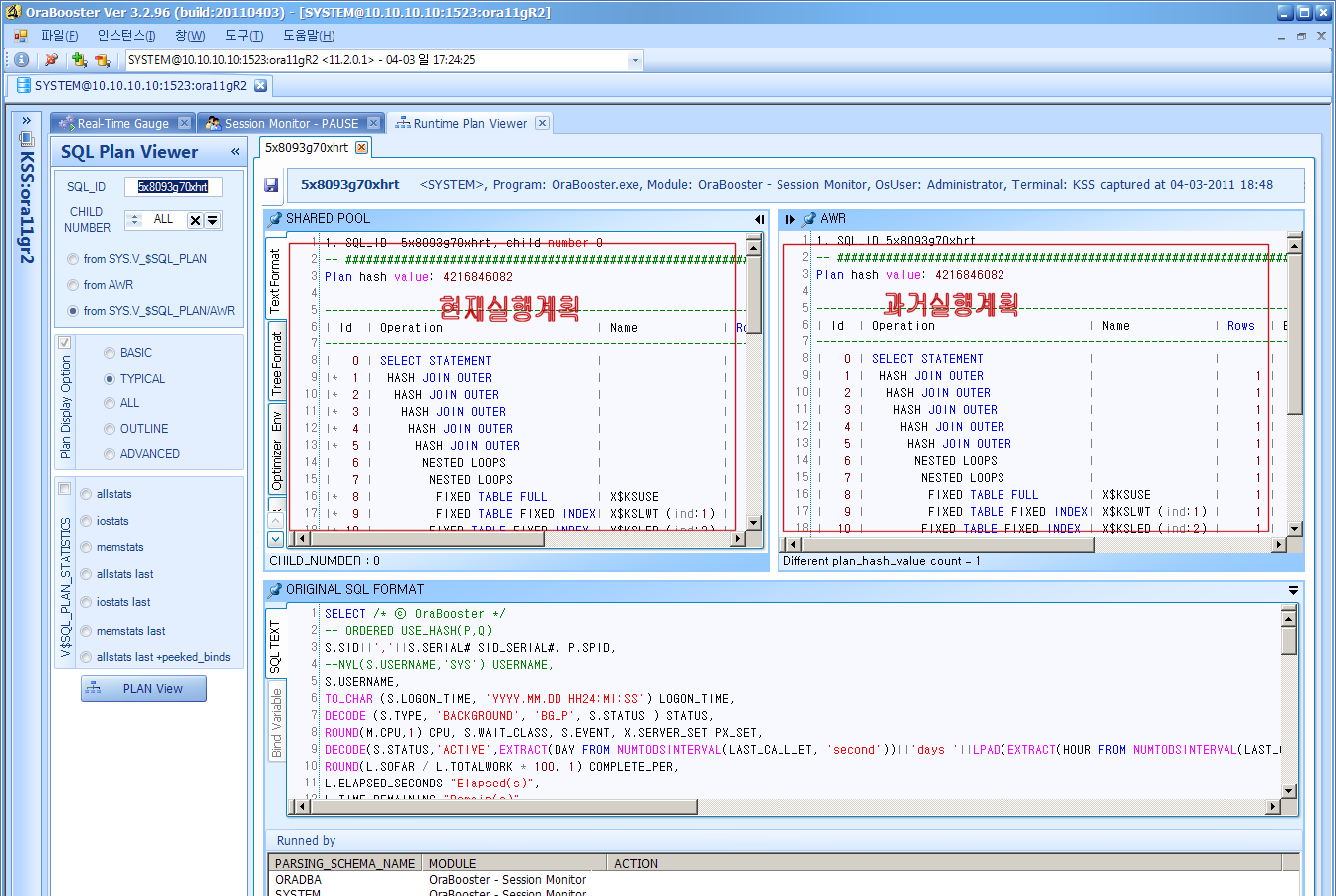
Enter a SQL_ID to view the current plan next to earlier plans kept in AWR. Check whether a statement that suddenly slowed down changed its plan.
Refine SQL while viewing the estimated plan together with table and index details. The time and blocks each step of the actual plan consumed are charted as well.
Create and save ASH, AWR and ADDM reports from the screen. Locks and transactions, tablespace usage and the alert log are in the same tool.
No installation on the database
OraBooster creates no tables, packages or other objects in the database it monitors.
There is nothing to install on the database server, and no separate server is needed to keep analysis data.
Sign in as SYS, SYSTEM or another account with DBA privileges and monitoring starts right away.
The Oracle connectivity module and the .NET runtime are included in the installer, so no separate Oracle Client is needed on the PC.
Supported environments
Evaluation copy
The download page is on GitHub. To use a purchased license, register it from the registration menu in the program. github.com/orascope/orabooster-download/tags
OraBooster adoption
Tell us the Oracle versions and number of instances to monitor, and the performance problems you most want to solve.
Download the evaluation copy and check connectivity and key features in your own environment. Every feature is available for six months.
Use the findings to discuss the number of instances and scope of support.
Use cases
Select the period when CPU usage or active sessions surged and see the SQL and wait events from that moment.
Compare plans to see whether one changed, then refine the SQL in SQL Runner while viewing its execution plan.
Prepare review material with AWR and ADDM reports and performance charts for a chosen period.
How it connects
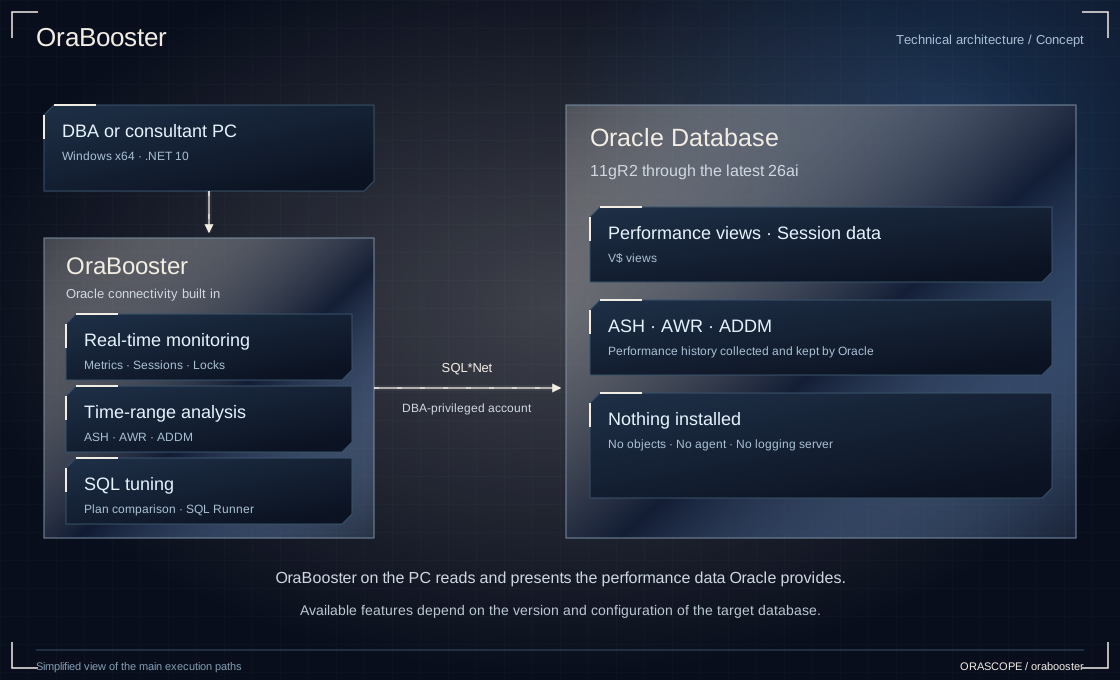
OraBooster is installed on a PC and connects to Oracle Database with a DBA-privileged account. It reads the performance views and ASH and AWR data that Oracle provides, and installs no objects or agents on the target database.
FAQ
No. OraBooster is a commercial product developed by ORASCOPE. Its source code is closed and it is provided under a commercial license.
Download the installer for the latest version from the orabooster-download repository on GitHub. It runs as an evaluation copy with every feature available for six months from the first run. The link is in the evaluation copy section of this page.
Nothing. OraBooster creates no objects in the target database and installs no agent on the server. Connect with a DBA-privileged account and it is ready to use.
Oracle Database 11gR2 (11.2.0.4) through the latest 26ai. CDB and PDB structures introduced in 12c are shown separately on screen.
No. The Oracle connectivity module is included in the program. Connect using a TNSNAMES.ORA file, or with just an IP address, port and service name.
64-bit Windows 11, Windows 10 and Windows Server 2016 or later. The .NET 10 runtime is included in the installer, so there is nothing else to prepare.
OraBooster reads the ASH, AWR and ADDM data that Oracle provides. Please confirm that the Oracle license terms of the target database allow those features to be used.
Tell us the Oracle versions and number of instances to monitor, the number of users, and the performance problems you most want to solve. We will review the license configuration together.
OraBooster
Tell us your Oracle versions, the number of instances and the problem you want to solve.